Texts From Your Club's Own Name — Plus One-Member Messages and a Searchable Archive
3 July 2026
Member View lets admins browse the club as any specific member — same boats, same limits, same buttons. Most 'it works for me' support questions become a ten-second check.
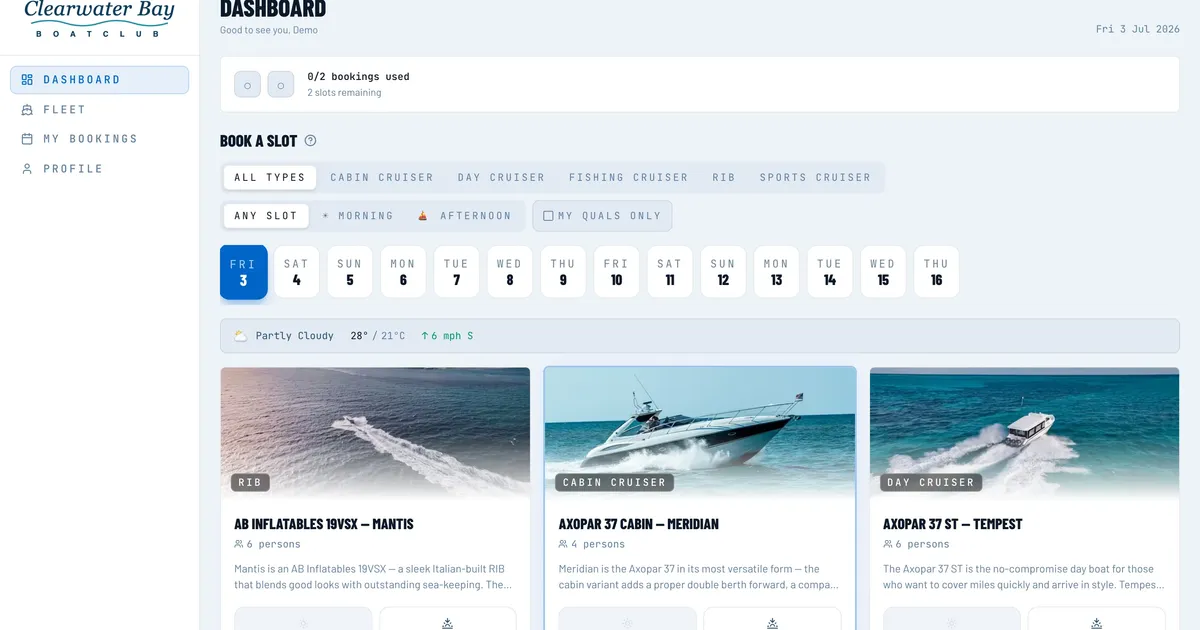
Every club admin knows the exchange. A member rings, or catches you on the pontoon: "I tried to book the RIB for Saturday morning and it won't let me." You open the calendar. The slot is free. The boat is in service. Nothing is blocked. So you say the words that help nobody: "That's odd — it works for me."
It does work for you. That is the whole problem.
If you run the club's software, you spend your time in the admin panel: the full calendar, every member, every boat, every setting. Members see something else entirely. They get their own dashboard, their own bookings, and only the boats they are allowed to take out. Booking quotas, qualification requirements, cancellation notice periods: from the admin side these are rows on a settings page. From the member side, they are the reason a button is grey.
So when a member reports a problem, you are debugging a screen you have never actually looked at. You can guess. You can ask them to describe what they see, which over the phone tends to go badly. Or you can ask for a screenshot and wait two days for a photo of a laptop taken on a phone, at an angle, with the important bit cropped off.
Member View, in Nauticore, lets an admin browse the club as any specific member. Open their record, switch to Member View, and you are looking at the app exactly as they see it when they log in: the same dashboard, the same boats, the same limits, the same buttons in the same states. If a boat needs a qualification they do not hold, you will not be able to book it either. If their cancel button is locked because the slot is inside the club's notice period, yours is locked too, with the same explanation on screen.
It is a view, not a disguise. You are there to look on their behalf, not to act in their name — the point is diagnosis.
Back to the RIB. Switch into that member's view, open Saturday morning, and the answer is usually staring at you. Perhaps they already hold two future bookings and the club's quota is two — the app says so, right where the booking button would be. Perhaps the RIB requires a powerboat qualification that nobody has recorded against their profile yet. Perhaps Saturday is fifteen days away and the booking window is fourteen.
None of these are faults. They are rules doing their job, which is exactly why they are invisible from the admin side: the rules do not apply to you. Ten seconds in Member View replaces guessing with reading.
It settles the other kind of call too. When a member insists something is broken and you suspect it is not, Member View ends the argument politely. Either you see what they see and can fix the real cause, or you see a working page and can walk them through it step by step, both of you looking at the same screen.
The other habit worth building: use Member View before you tell the club about a change. Say the committee has decided to shorten the booking window from fourteen days to ten, or to add a qualification requirement to the fast RIB. You know what the setting looks like. Do you know what an ordinary member will see on Monday morning?
Pick a typical member, not a committee member carrying three extra roles, and have a look. Where does the change actually show up? Is the explanation the app gives clear enough, or is it about to generate forty confused emails? Two minutes of this before a broadcast announcement tends to save a week of replies after it.
Looking at the club through a member's account is a sensitive thing to do, and it should feel like one. While you are in Member View, a banner stays on screen the whole time, so there is never any doubt about whose view you are in or how to get back to your own. And because every admin action at the club sits in a full audit log, there is a record of the session — who looked, at whom, and when.
Compare that with how this problem usually gets solved in clubs: the member reads their password out over the phone so the secretary can "have a quick look". Everyone knows it happens. Everyone knows it should not. Member View exists so it does not have to — no shared passwords, no borrowed logins, and a proper trail either way.
"That's odd, it works for me" was never really an answer. "Give me ten seconds" is a much better one.
See it in action
All Nauticore features are live in the interactive demo — no signup required.